

Venue Race software
Project a live race onto a screen or a wall with Concept2's free Venue Race software, a laptop and your rowing machines.
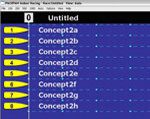
You can project races onto a screen, or even a wall, with competitors' names up in lights, which really appeals to kids and adults alike. The software is free, so all you need is a laptop and your rowing machines.
Venue Race is now ErgRace
Concept2 has replaced its Venue Race software with ErgRace, and no longer updates or supports Venue Race. ErgRace connects two or more machines to race individuals or teams over a set time, distance or number of calories, and shows the race on a big screen for everyone watching. You can download it from Concept2's software support page.
Setting up
As well as the software, you'll need a computer, a USB cable and ideally a projector to show the race on a wall or screen.
- PM5 and PM4 monitors link together with Ethernet (RJ45) network cables, and up to 40 machines can be connected this way. Link each monitor to the next in a daisy chain, then connect one of them to the laptop with a USB cable.
- PM3 monitors each need a USB cable to the computer. If you have more cables than USB ports, connect the monitors to a powered USB hub and then connect the hub to the computer. You can connect up to 16 machines with several hubs, although the system is much more stable with 12 or fewer.
If you need help setting up a race, call us on 0115 945 5522.